Reference :- http://www.woodwardweb.com/teamprise/disabling_tfs_a.html
From time to time I hear from people who dislike the automatic check out behaviour common with TFS. One of the great things about TFS is the the pending changes list that shows you the files you have currently checked out and allows you to easily undo any un-intentional check outs. While I personally find the auto-checkout features a productivity boon - like most things there is a preference that you can use to adjust the default behaviour if you find it causes problems with the way you like to work.
In Visual Studio 2008 (with the Team Explorer 2008 installed), go to Tools, Options, Source Control, Environment and change the Checked-in items for Saving and Editing to "Prompt for check out" rather than the default which is "Check out automatically".

This will then prompt you before the automatic checkout occurs and give you the opportunity to cancel if you wish.
In Eclipse with Teamprise installed, go to Window, Preferences (or Eclipse, Preferences on the Mac) and then Teamprise, Source Control to enable prompting before check out.

That said, I would strongly encourage you to stick with the defaults and have Multiple check outs enabled in TFS for your Team Project and also keep the Pending Changes view on screen (in VS View, Other Windows, Pending Changes or in Eclipse Window, Show View, Other, Teamprise, Pending Changes). That way you can always see what you have checked out at any time and immediately undo any check-outs that you no longer need.
http://www.woodwardweb.com/teamprise/disabling_tfs_a.html
From time to time I hear from people who dislike the automatic check out behaviour common with TFS. One of the great things about TFS is the the pending changes list that shows you the files you have currently checked out and allows you to easily undo any un-intentional check outs. While I personally find the auto-checkout features a productivity boon - like most things there is a preference that you can use to adjust the default behaviour if you find it causes problems with the way you like to work.
In Visual Studio 2008 (with the Team Explorer 2008 installed), go to Tools, Options, Source Control, Environment and change the Checked-in items for Saving and Editing to "Prompt for check out" rather than the default which is "Check out automatically".
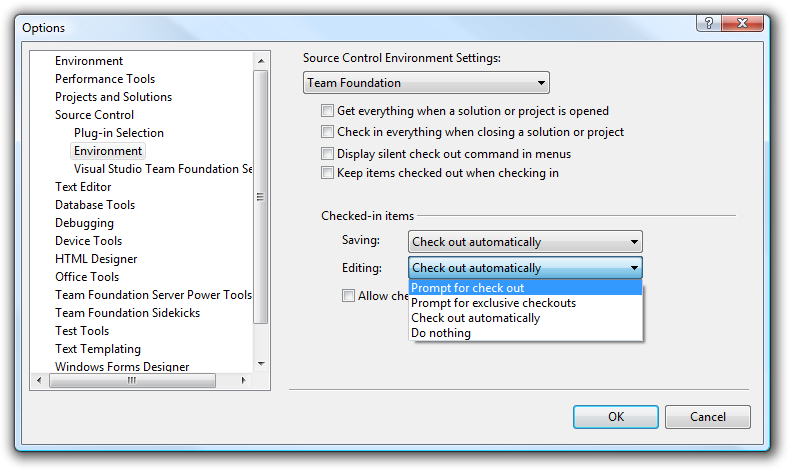
This will then prompt you before the automatic checkout occurs and give you the opportunity to cancel if you wish.
In Eclipse with Teamprise installed, go to Window, Preferences (or Eclipse, Preferences on the Mac) and then Teamprise, Source Control to enable prompting before check out.
_2.png "Teamprise Source Control preferences")
That said, I would strongly encourage you to stick with the defaults and have Multiple check outs enabled in TFS for your Team Project and also keep the Pending Changes view on screen (in VS View, Other Windows, Pending Changes or in Eclipse Window, Show View, Other, Teamprise, Pending Changes). That way you can always see what you have checked out at any time and immediately undo any check-outs that you no longer need.
http://www.woodwardweb.com/teamprise/disabling_tfs_a.html

